
A recipe from a fridge photo: baked chicken and zucchini
To build a recipe from a fridge photo on GetYourMacros, go to the "From ingredients — What you have at home" tab in Genera and tap "Fotografa il frigo o la dispensa" (Photograph your fridge or pantry). The app recognises up to 12 foods and lists them with estimated grams where possible. You remove the items you do not want to use and tap "Genera" (Generate). The recipe arrives with calories and macros for each serving calculated by the app's food database. In the demo, chicken breast, zucchini, eggs, Greek yogurt and cherry tomatoes turn into baked chicken and zucchini with herbed yogurt. Below you find the video, the steps one by one, what it recognises and what it leaves out, the recipe with values for each serving, where the numbers come from and how to try it.
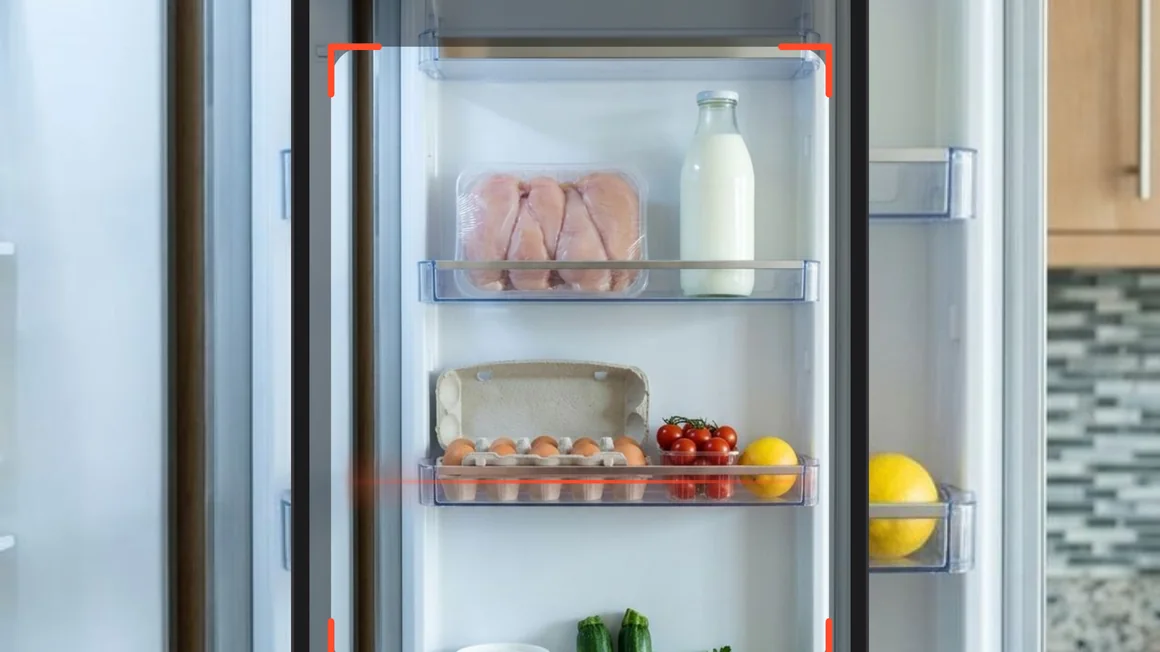
How to photograph your fridge and get the recipe
Up to 12 clearly visible foods are recognised in a single shot, so you can build a meal without typing ingredients by hand. When you photograph your fridge, the app reads what you have and calculates calories and macros for each serving using its food database.
- On the Home screen, tap "+ Aggiungi" (Add) next to the meal and pick "Genera" (Generate) from the wheel.
- Stay on the tab "From ingredients — What you have at home".
- Tap "Fotografa il frigo o la dispensa" (Photograph your fridge or pantry).
- The camera reads "Inquadra il frigo o la dispensa" (Frame your fridge or pantry): tap to capture, pinch to zoom.
- Wait a few seconds while the tile shows "Recognising the foods…".
- Check the tile "From your fridge: N foods": tap × to remove items, edit the grams, or type extra foods up to the limit of 12.
- Tap "Genera".
- Review the title, servings, meal, macros for each serving, editable ingredients, and steps.
- Tap "Add to lunch" (or your chosen meal) or "Save".
The video below shows these steps in 14 seconds using the app's demo.
What it recognises in the photo and what it leaves out
At most 12 foods are extracted from your shot, giving priority to proteins, vegetables, dairy, grains and legumes. The system reads only what is clearly visible, so it never guesses what a closed box or bag holds. Names appear as simple singular terms, without brands, and grams are estimated only when the edible amount in sight can be judged. Using an app that recognises ingredients from a photo saves you typing, but follows strict rules.
- What it leaves out: prepared dishes and leftovers in containers, drinks (except milk and plain yogurt), bottled sauces and condiments, spices, salt, oil and sweets. That is intentional, as the AI can add oil, salt and spices on its own.
- If nothing is found: the tile reads "No food recognised" with "More light, get closer, or write what you have below."
- Languages: food names arrive in the app's language, across 9 languages, and match the food database like typed ones.
- Privacy and limits: the app does not keep the photo, and taking it costs nothing: no AI assist and no recipe of the day is used up.
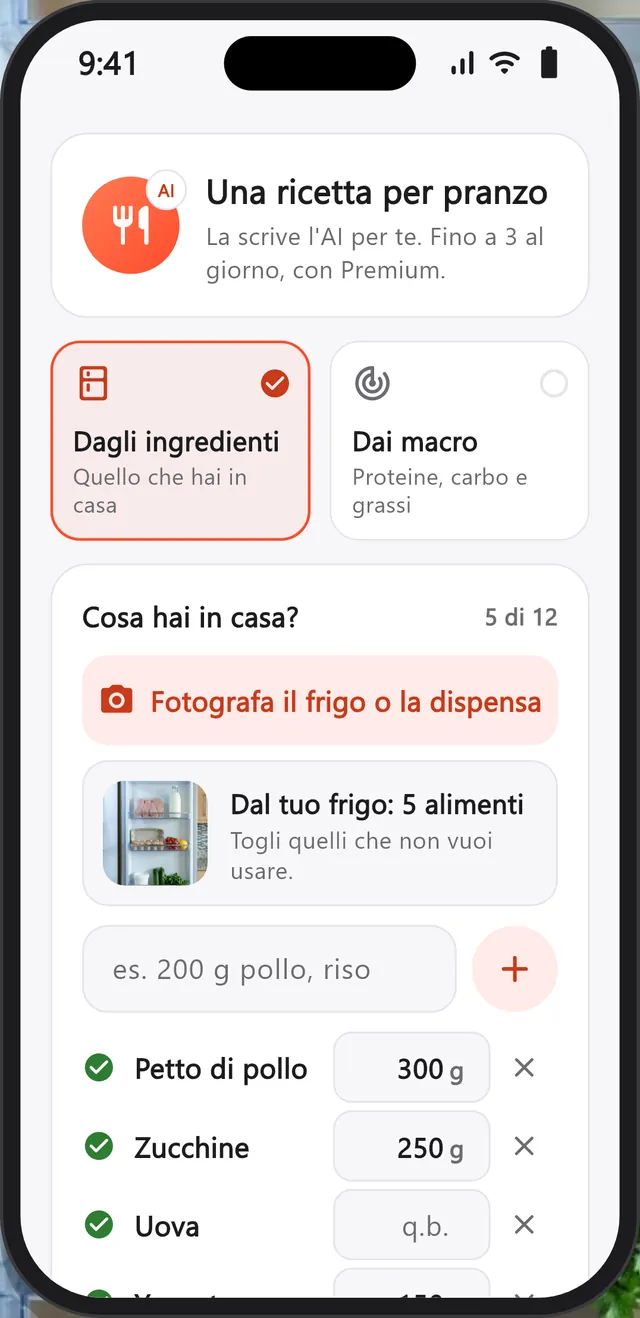
In the screenshot below, you can see the 5 foods from the demo added to the list.
The recipe: baked chicken and zucchini with herbed yogurt
This recipe for 2 servings provides 420 kcal, 51 g of protein, 10 g of carbs and 20 g of fat for each serving, calculated from the app's food database.
The dish bakes chicken and vegetables in the oven. You finish it with herbed yogurt as a sauce and hard-boiled egg wedges. It fits your daily targets by supplying plenty of protein from chicken, eggs and yogurt, while keeping carbs low. The fat comes almost entirely from the eggs, yogurt and 10 g of extra virgin olive oil added for seasoning.
Here we show it using all the amounts recognised from the photo: 300 g of chicken breast, 250 g of zucchini, 120 g of eggs (2 eggs), 150 g of Greek yogurt and 200 g of cherry tomatoes. To make this baked chicken and zucchini, you will find the ingredients in the table below, followed by the steps.
| Ingredient | Grams | kcal | Protein | Carbs | Fat | In the database |
|---|---|---|---|---|---|---|
| Chicken breast | 300 g | 330 | 69 g | 0 g | 3.6 g | Chicken breast |
| Zucchini | 250 g | 42 | 3.2 g | 7.8 g | 0.8 g | Zucchini |
| Eggs | 120 g | 156 | 15 g | 0.8 g | 10.8 g | Eggs |
| Greek yogurt | 150 g | 184 | 13.5 g | 5.8 g | 15 g | Full-fat Greek yogurt |
| Cherry tomatoes | 200 g | 36 | 1.8 g | 6 g | 0.4 g | Cherry tomatoes |
| Extra virgin olive oil | 10 g | 90 | 0 g | 0 g | 10 g | Extra virgin olive oil |
| Whole recipe, 2 servings | 1,030 g | 839 | 103 g | 20 g | 41 g | |
| For each serving | 515 g | 420 | 51 g | 10 g | 20 g |
Values for 100 g from the GetYourMacros food database, read on 4 November 2026, with full-fat Greek yogurt and 10 g of extra virgin olive oil to season. Rows are rounded: their sum can differ from the total by 1. In the video the demo's review shows example values, not these.
The steps, as the app wrote them (translated from Italian):
- Heat the oven to 200 °C. Slice the zucchini into rounds and halve the cherry tomatoes, season with oil, salt and oregano.
- Lay the chicken breast on the vegetables, season with pepper and paprika and bake for 20-25 minutes.
- Mix the Greek yogurt with fresh herbs and a pinch of salt. Serve with the hard-boiled eggs cut into wedges.
Calories and macros: where the numbers come from
On 4 November 2026, we calculated the values for this page using the app's food database for 2 servings, whereas the 560 kcal for 1 serving shown in the demo video and screenshots are illustrative numbers.
On the review screen, the recipe's calories and macros are calculated by the app's food database from the grams of each ingredient, not from numbers the model declares. Under each row you see "Matched: …" with the database food used for the figures. Values for each serving start from the grams on every line: if you change them, the macros recalculate before you save.
Here are three things to check:
- The type of yogurt: switching from full-fat to 0% Greek yogurt drops a serving from 420 to 370 kcal and 20 to 13 g fat.
- The oil: the photo does not read condiments, but the app adds them (10 g of extra virgin olive oil is 90 kcal).
- The estimated grams: edit them if your pack differs. In this demo, the eggs had no grams and became 120 g, which is 2 eggs.
You can see this in the screenshot below.
From the recipe to lunch, the plan and the shopping list
"Add to lunch" opens "How much will you have?": you pick the portion in half portions with − and +, starting from the one suggested for that meal, and see its calories and protein. The recipe goes into the meal next to the dish of your meal plan, without costing you a swap.
If you would rather cook it later, tap "Save" to store it in "My recipes". From that screen, "Add to the list" sends every ingredient straight to your shopping list, arranged by supermarket.
If you would rather type the ingredients by hand, see the guide to recipes from the ingredients you have; to start from grams of protein, carbs and fat, see the guide to recipes from your macros.
What it costs and how to try it
With Premium, you can generate up to 3 recipes a day. Taking a photo costs nothing, and the daily limit counts down only when the recipe succeeds.
To try the feature, tap "Genera" (Generate) from any meal and choose "Fotografa il frigo o la dispensa" (Photograph your fridge or pantry). The rest of GetYourMacros remains free without creating an account, including the weekly plan, diary, and shopping list.
Frequently asked questions
Can I photograph the pantry or the kitchen counter too?
Yes, you can photograph the fridge, the pantry, a shelf, or your kitchen counter. The model recognises at most 12 clearly visible foods, prioritising proteins, vegetables, dairy, grains, and legumes. It never guesses what closed boxes or bags hold, and leaves out prepared dishes, bottled sauces, spices, oil, and sweets.
What if it recognises the wrong food or skips one?
You can adjust the list directly on the screen. The × removes any unwanted row. If an ingredient was missed, retake the shot or type it into the field below. You can also edit the estimated grams on any item.
Is the photo of my fridge stored?
No, the app does not keep the photo. Your phone shrinks the image, sends it to the recognition service, and keeps only the resulting list of foods.
How many recipes can I make in a day?
You can generate up to 3 recipes a day with Premium. Photographing costs nothing and uses no allowance. The count decreases only when you tap Genera (Generate) and the AI successfully writes the recipe. If quality checks fail, your daily count is not used up.
The recipes you make from your fridge go into the meals of your weekly plan. Discover the GetYourMacros weekly meal plan.
Start for free
Download GetYourMacros, open lunch, tap Genera and photograph your fridge.