
Recipes from your macros: a meal built from protein, carbs and fat
In GetYourMacros you state the grams of protein, carbs and fat a meal must be worth, and the app proposes one of the 495 published recipes with a photo in its library, adapted to your numbers, or writes one from scratch. Getting recipes from your macros helps you fill your diary. You review the dish, add it to the meal and send the ingredients to the shopping list. Below you see the steps on screen, where the recipe comes from, eight breakfasts taken from the library, how precise the macros are and how to try the feature.

Why “I’m 40 g of protein short” is not solved by a random recipe search
When you search for a 40 g protein breakfast, the problem is that you start from numbers, not from the dish.
If you track your macros, you often have a meal to fill. You might have run out of fat for the day, or you need carbs before the gym. A standard recipe book works backwards. It makes you pick a photo and then gives you the ingredients.
If you look online for a high-protein dish, you find vague ideas. The recipes lack exact grams, or they are calculated for portion sizes that do not match your needs.
As a result, you have to reach for a calculator. You must recalculate every single ingredient to hit the calories and nutrients you lack. You waste time in the morning. Often, the final dish loses its original proportions, becoming unbalanced or hard to cook. You need a different approach, one that starts from your constraints and ends with the food.
How to generate a recipe from your macros, step by step
The steppers move in 5 g steps so you can generate a recipe from macros that exactly match what you miss. When you reach the end of the day or need to prepare breakfast, filling the gaps in your plan becomes a matter of maths. The app turns those precise numbers into a real dish.
- On the Home screen tap "Add" next to the meal. A wheel opens and you tap "Generate".
- Choose the "From macros" tab.
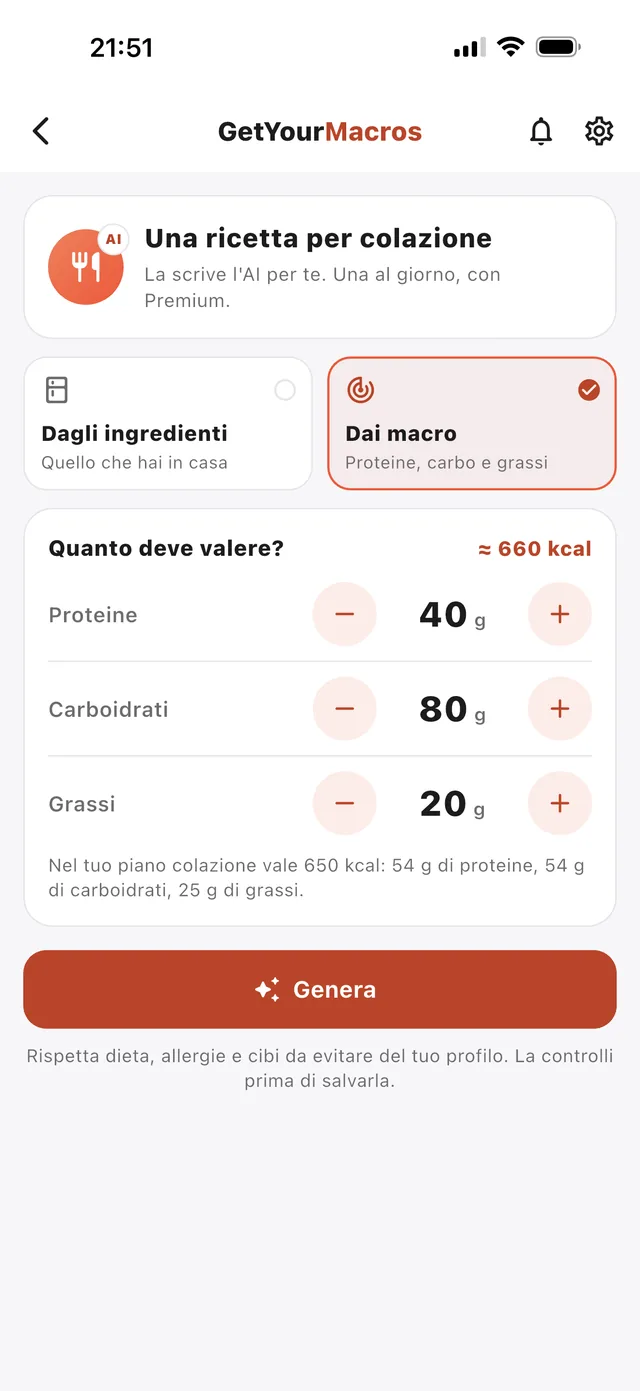
- Set the three steppers: Protein from 5 to 150 g, Carbs from 0 to 250 g and Fat from 0 to 100 g. On the right you read "≈ N kcal".
- Tap the "Generate" button.
- Review the proposed recipe. You check the title, portions, meal, Macros per portion, ingredients in grams and steps.
- Tap "Add to breakfast" (or the chosen meal) or "Save".
If you prefer to start with what you already have in the kitchen, use the "From ingredients — What you have at home" tab where you enter up to 8 ingredients. You check how it works in the screenshot below.
From the library or written from scratch: what you get
The app searches first through its 495 published recipes, all with a photo as of 9 October 2026. It finds a base and adapts it. It keeps calories within 10% either way, guarantees at least 90% of the protein requested, and holds carbs and fat within 35% or 12 g. It never suggests a dish already in your week or seen in the last 30 days. The screen then reads "From our library, adapted to your request."
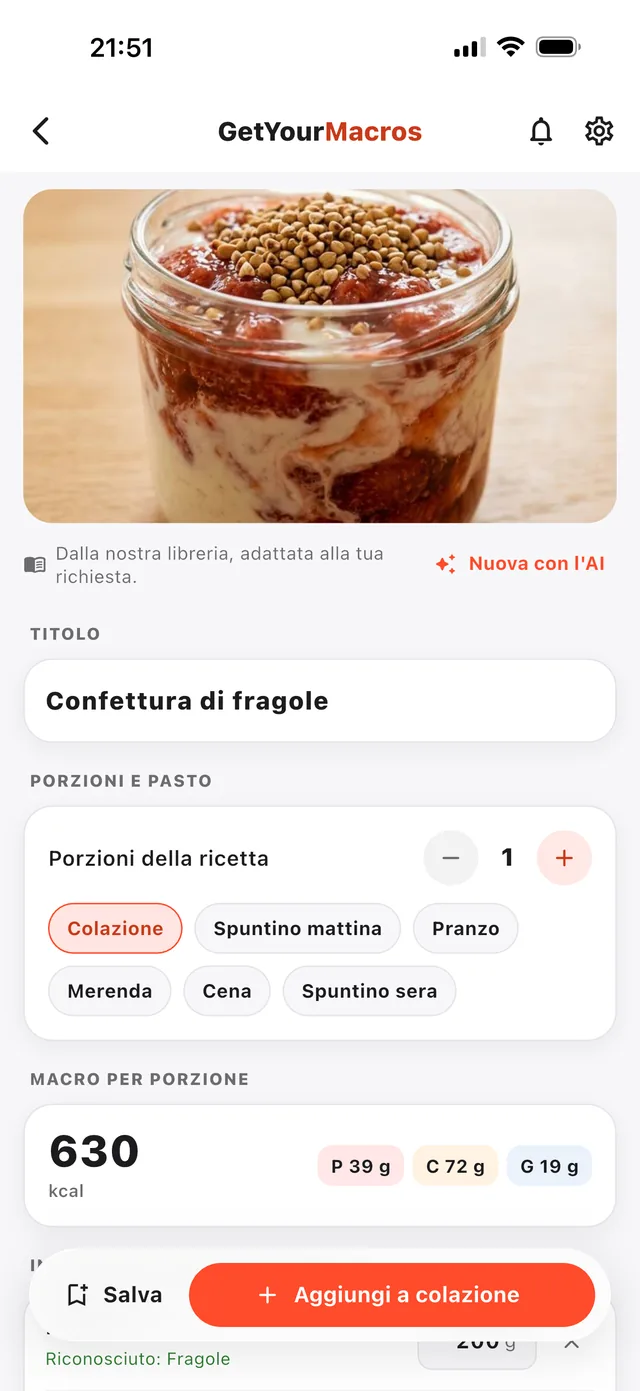
If you ask for 40 g of protein, 80 g of carbs and 20 g of fat (≈ 660 kcal), you get a recipe tailored to your macros. For example, it proposes "Confettura di fragole", a jar of yogurt and strawberries, with 630 kcal, 39 g of protein, 72 g of carbs and 19 g of fat.
If nothing in the library fits, the app writes one from scratch. It generates one portion, using 3 to 9 ingredients, in at most 6 steps, without a photo. You can also request this on purpose using the "New with AI" button. You review all this in the screenshot below.
Eight library breakfasts with 43 to 58 g of protein
The app library holds 80 breakfasts ready to adapt to your numbers. Of these, 55 offer at least 30 g of protein per portion, and 21 reach at least 40 g. Across all meals, you will find 161 recipes with at least 40 g of protein. You have plenty of options to plan your high protein breakfasts.
In the table below you see eight examples. You can try the savoury skyr with bresaola and arugula (456 kcal, 58 g protein, 36 g carbs, 9 g fat) or the scrambled eggs with bresaola and chives (360 kcal, 51 g protein, 2 g carbs, 17 g fat). There is also a silken tofu scramble (533 kcal, 45 g protein, 51 g carbs, 17 g fat) for a vegan diet.
These dishes cost little if you learn to pick cheap protein sources to fill your macros.
| Breakfast | kcal | Protein | Carbs | Fat | Diet | Minutes |
|---|---|---|---|---|---|---|
| Savoury skyr with bresaola and arugula | 456 | 58 g | 36 g | 9 g | omnivore | 5 |
| Mango and almond skyr bowl | 522 | 53 g | 48 g | 13 g | vegetarian | 15 |
| Scrambled eggs with bresaola and chives | 360 | 51 g | 2 g | 17 g | omnivore | 10 |
| Cloud eggs with shrimp and zucchini | 315 | 50 g | 5 g | 12 g | pescatarian | 20 |
| Lemon quark with fresh peaches | 414 | 48 g | 48 g | 9 g | vegetarian | 10 |
| Egg white omelette with smoked salmon and courgettes | 405 | 47 g | 28 g | 13 g | pescatarian | 15 |
| Silken tofu scramble | 533 | 45 g | 51 g | 17 g | vegan | 10 |
| Sautéed seitan with mushrooms | 353 | 44 g | 14 g | 14 g | vegan | 15 |
Values for each portion from the GetYourMacros library, read on 9 October 2026; the proposed recipe is then adapted to the grams you ask.
From the recipe to the meal, the plan and the shopping list
Adding the recipe to a meal costs no plan swap. From the review screen, you decide what to do with the dish you just created or adapted.
If you tap "Add to breakfast", or whichever meal you chose at the start, the recipe enters your day immediately. It counts towards the meal's macros, sitting alongside the other recipes in your meal plan. If you prefer to keep it for the future, you tap "Save" and find it stored in "My recipes".
From there, sorting out your shopping is straightforward. On the recipe page, the "Add to the list" button sends the ingredients straight to your shopping list, keeping them split by supermarket. This lets you fill the gaps in your daily macros precisely, without having to overhaul or recalculate your whole weekly menu from scratch.
How accurate the recipe’s macros are
Ingredient grams are rescaled between 0.6 and 1.6 times to land on the calories asked. Calories and macros are calculated by the app's food database from the grams of each ingredient, not from numbers the model declares.
A library recipe can differ from your request. Calories stay within 10% either way, protein meets at least 90%, and carbs and fat vary within 35% or 12 g. If you ask for 660 kcal, you might get a jar of yogurt and strawberries at 630 kcal. The recipe is checked against the allergies, foods to avoid and diet of your profile. If it fails, it is redone once, then refused, and the day is not used up.
You review and edit everything before saving. Alongside the macros per portion, check these three things:
- The ingredients found in the database, marked with "Recognised: …".
- The amounts in grams for each food.
- The preparation steps.
What it costs and how to try it
Generating a meal from your macros is a Premium feature limited to one recipe a day, and you can try it free for 7 days. Your daily allowance is only used up when the recipe succeeds.
The rest of the GetYourMacros app is free to use. You can build your weekly meal plan, fill in your diary, and check your shopping list without paying. You do not even need to create an account to use these features.
Frequently asked questions
Is there an app that creates recipes based on your macros?
Yes, GetYourMacros searches its library of 495 published recipes or writes one from scratch. You choose the grams of protein, carbs and fat you need. The app adapts the quantities to fit the numbers for your meal.
Can I ask for a breakfast with 40 g of protein and little fat?
Yes, the library already holds 21 breakfasts with at least 40 g of protein per portion. You set the protein stepper to 40 g and keep the fat low. The app suggests options like scrambled eggs with bresaola and chives.
Are the recipe’s macros calculated or estimated?
They are calculated by rescaling the recipe's ingredients between 0.6 and 1.6 times to hit your target. The app's food database works out the macros from the exact grams of each ingredient. They are never estimated.
Does it also work with what I have in the fridge?
Yes, you can enter up to 8 ingredients in the "From ingredients — What you have at home" tab. You list them, with or without grams. The app proposes a dish based on what you need to use up, respecting the allergies in your profile.
Generated recipes go into the meals of your Discover the GetYourMacros weekly meal plan.
Start for free
Download GetYourMacros, open a meal, tap Genera and ask for the recipe that makes your numbers.