
Recipes from the ingredients you have, with calories and macros
To get recipes from the ingredients you have, type up to 8 ingredients in GetYourMacros and the app suggests a dish for that meal. It checks its library of 495 recipes with a photo first. If none fits using only what you typed, it writes one from scratch. Calories and macros per portion come from the food database. You review the dish, add it to dinner, and can send the ingredients to the shopping list. In our example, 2 eggs, canned tuna, zucchini, and rice became a dinner with 637 kcal and 40 g protein. Below: the video, the steps, the full example, how it picks the recipe, how to type your ingredients, how accurate the numbers are and how to try it.

Why fridge-clearing recipes rarely fit your macros
Standard online recipes start from your ingredients but ignore your daily intake entirely. They do not know how many calories you have left for dinner or how much protein you still need to hit your macros. The quantities listed in those dishes, when they even give grams, suit generic servings that bear no relation to your numbers.
You might cook a practical dish to use up what's in the fridge, but you still have to weigh everything from scratch, log each food by hand, and adjust the totals to make dinner fit. In the evening, after a long day, tiredness wins. Rather than working through manual calculations, you leave the odds and ends in the drawer, order takeaway, waste food, and miss your targets.
How to make a recipe from your ingredients, step by step
You can make a recipe from your ingredients straight from the Home screen by entering up to 8 ingredients you have left.
- On the Home screen, tap "+ Aggiungi" (Add) next to the meal and select "Genera" (Generate) from the wheel.
- Select the "From ingredients — What you have at home" tab.
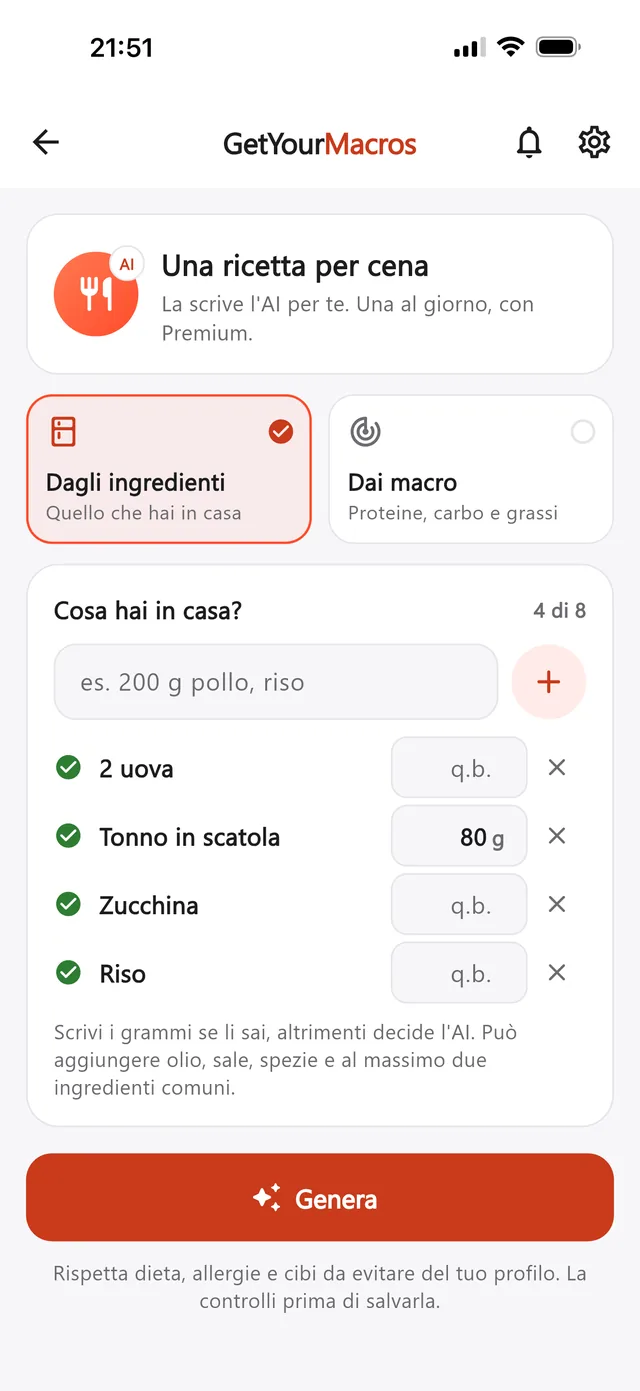
- In the "What do you have at home?" box, enter one item at a time using the + button up to the "N of 8" counter. Add the grams if you know them, or leave the field blank so it defaults to "q.b." (as much as needed).
- Tap the "Generate" button.
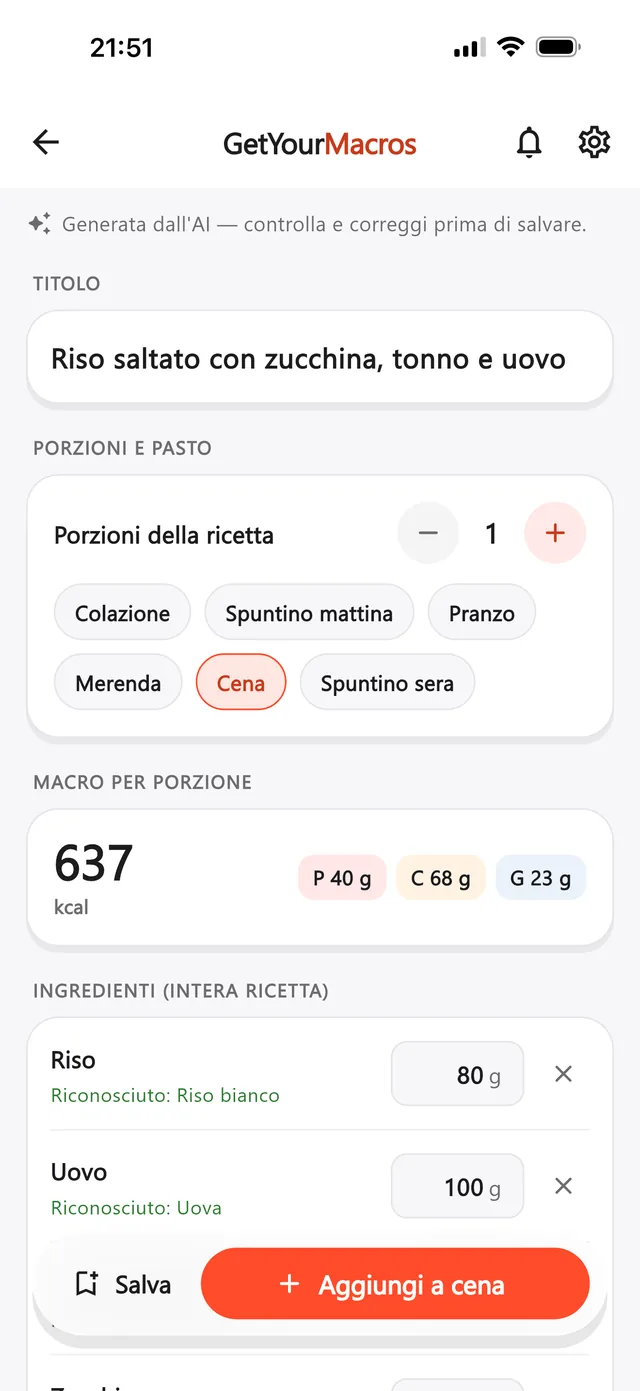
- Check the recipe details, including title, servings, meal, "Macros per serving", editable ingredients and steps.
- Tap "Add to dinner" (or your chosen meal) to log the dish, or tap "Save".
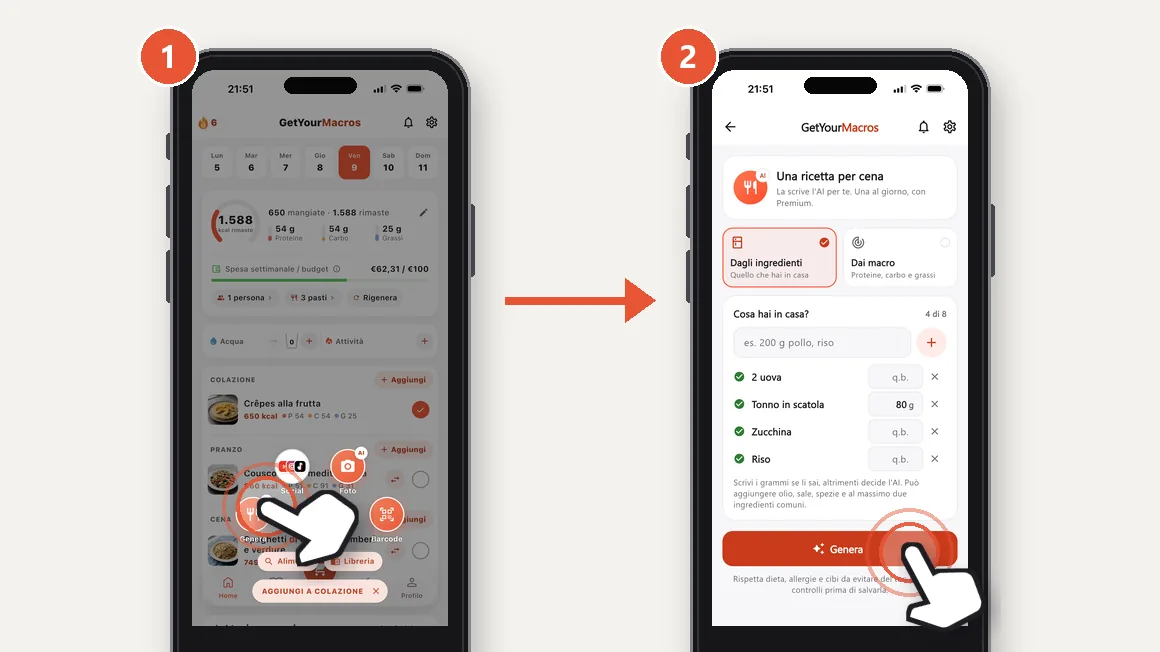
The other tab, "From macros", starts from grams of protein, carbs and fat instead: see the guide to recipes from your macros . The video below shows the same steps in 13 seconds.
A real example: eggs, tuna, zucchini and rice
The request in the video is a dinner with eggs and tuna: "2 uova" (2 eggs), "Tonno in scatola" (canned tuna) with 80 g, "Zucchina" (zucchini) and "Riso" (rice), with a hint of about 600 kcal, what dinner is worth in the plan. Because nothing in the library fitted, the app wrote a dish from scratch.
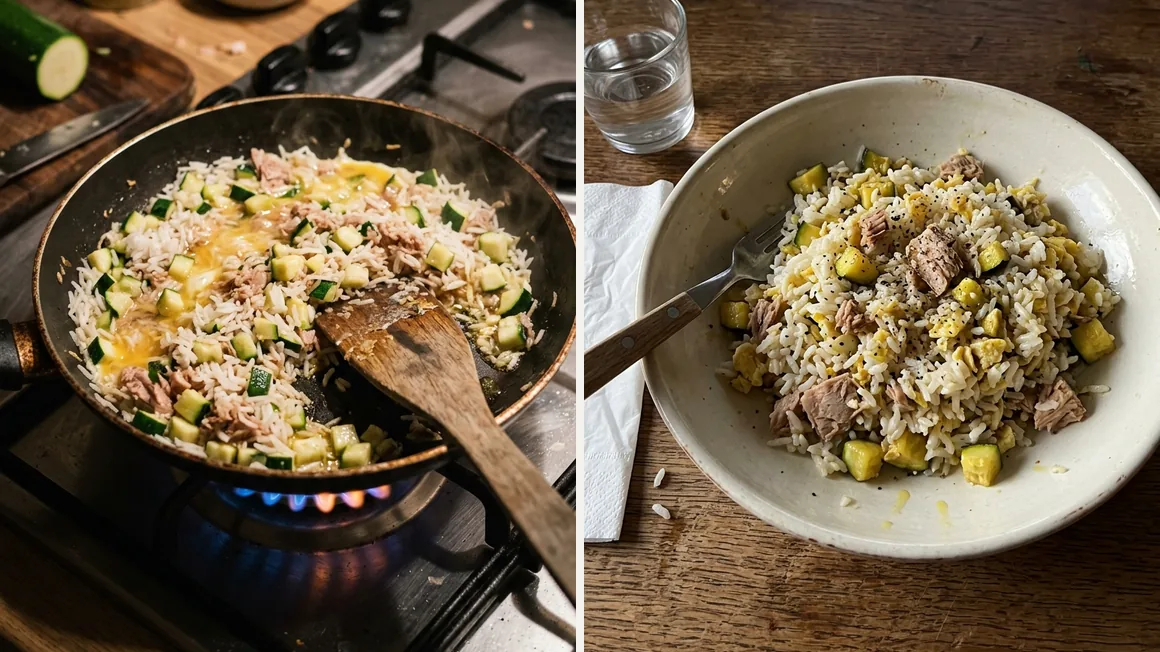
It produced "Riso saltato con zucchina, tonno e uovo" (stir-fried rice with zucchini, tuna and egg). The recipe makes 1 portion, takes 20 minutes, and provides 637 kcal, 40 g protein, 68 g carbs and 23 g fat over 6 steps.
Three details stand out on screen. The "2 eggs" became 100 g. The canned tuna kept the typed 80 g, matched as "Canned tuna in olive oil". Extra virgin olive oil at 5 g was the only ingredient added.
The final calories sit close to the hint, not on it. The ingredient table and the steps are inserted below.
| Ingredient | Grams | kcal | Protein | Matched as | Note |
|---|---|---|---|---|---|
| Rice | 80 g | 284 | 5.6 g | White rice | |
| Eggs | 100 g | 130 | 12.5 g | Eggs | typed as “2 uova” (2 eggs) |
| Canned tuna | 80 g | 152 | 20 g | Canned tuna in olive oil | 80 g as typed |
| Zucchini | 150 g | 26 | 1.9 g | Zucchini | |
| Extra virgin olive oil | 5 g | 45 | 0 g | Extra virgin olive oil | added by the app |
| Total, 1 portion | 415 g | 637 | 40 g | 68 g carbs, 23 g fat | |
Values calculated by the app from its food database, answer of 15 October 2026; the rounded rows can differ from the total by 1 kcal.
The steps, as the app wrote them (translated from Italian):
- Boil the rice in salted water and drain it al dente.
- Cut the zucchini into small cubes.
- Heat the oil in a pan and sauté the zucchini for about 5 minutes.
- Add the drained tuna and the rice to the pan with the zucchini.
- Pour in the beaten eggs and stir constantly until they are cooked.
- Season with salt and pepper and serve hot.
From the library or written from scratch: how the app chooses
The app first checks the 495 published recipes in its library, all with a photo. It suggests a library dish only if it suits your meal, uses at least 2 of your ingredients, and never asks for more grams than you typed. Every main ingredient must be on your list, pantry basics such as oil, garlic, salt, pepper, herbs and spices aside. It never suggests a dish already in your week, nor one Genera gave you in the last 30 days. The screen then reads "From our library, adapted to your request."
If there are no recipes with what you have, it writes one from scratch. It uses mostly your ingredients, keeps the grams you typed, and may add oil, salt, spices, herbs and at most 2 common ingredients. It writes one portion, 3 to 9 ingredients, at most 6 steps, without a photo. The screen reads "Generated by AI — review and fix before saving." The "New with AI" button lets you ask, once, for a recipe written from scratch instead of the library one.
How to type your ingredients to get more choice
The library had 331 lunch and dinner dishes on 21 October 2026. What you type decides how many options the app can find. Four habits help when deciding what to cook with what you have:
- Add the basics: a library recipe appears only if you have every main ingredient. Among them, onion appears in 64 dishes, tomato passata in 47 and parmesan in 44. If you have them, type them in.
- State grams only when limited: the app uses the exact figures you enter. In the real example, canned tuna stayed at 80 g. Leaving the field empty shows "q.b." (as much as needed).
- Specify the variety: macros come from the database entry matched to your text. In the example, canned tuna was matched as "Canned tuna in olive oil". If yours is tuna in water, say so.
- Skip your diet and allergies: they come from your profile, with the foods to avoid.
The table below lists the ingredients found in the most library dishes.
| Ingredient | Lunch and dinner dishes |
|---|---|
| Onion | 64 |
| Zucchini | 48 |
| Tomato passata | 47 |
| Parmesan | 44 |
| Eggs | 42 |
| Lemon juice | 40 |
| Chicken breast | 35 |
| Cherry tomatoes | 34 |
| Potatoes | 34 |
| Carrots | 30 |
Published GetYourMacros library dishes using the ingredient, out of 331 for lunch and dinner, read on 21 October 2026. Oil, garlic, salt, pepper, herbs and spices do not count. Rice varieties are counted separately: white 17, basmati 11, wholegrain 6, risotto rice 5.
How reliable the calories and macros are
In the example, the recipe reaches 637 kcal, close to the hint of about 600 kcal for dinner. The numbers are not declared by the model. The calories and macros per serving are calculated by the app's food database directly from the grams. Under each row you will see "Matched: …" with the exact food used for the figures.
The app checks the recipe against your allergies, diet, and foods to avoid, running quality checks on grams, calories, steps, and unknown foods. If something is wrong, it tries again once; if it fails again, it is refused and your day is not used up.
The recipe gets close to the meal; you then choose the portion yourself. Before saving you can edit the grams, which recalculates the macros, or delete a row with the ×.
Check three things on the review screen:
- The matched food under each ingredient, for example tuna in oil or in water.
- The grams in each row, compared with what you really have.
- The steps to prepare the meal.
See the details in the screenshot below.
From the recipe to dinner, the plan and the shopping list
Tapping "Aggiungi a cena" (Add to dinner) opens "How much will you have?", where you adjust the amount in half portions using − and +. It starts with a suggested portion sized for that meal, showing the exact calories and protein right away. Once confirmed, the recipe goes into that day's dinner, next to the dish from your meal plan, without costing you a swap.
If you prefer to cook it another day, tap "Save" to store it in "My recipes". From the saved recipe page, tapping "Add to the list" sends the ingredients straight to your shopping list, split by supermarket.
And if the recipe you want came from a reel, you can import recipes from Instagram and TikTok and add them to your meals the same way.
What it costs and how to try it
This feature is included in Premium, with one recipe a day. A library answer also counts as your daily recipe, but the day is only used up when the recipe succeeds. You can try it free for 7 days to test how it handles your meals.
The rest of GetYourMacros is free to use without creating an account. You can follow your weekly plan, keep the diary, and use the shopping list.
Frequently asked questions
Is there an app that makes a recipe from what's in my fridge?
You can type up to 8 ingredients into GetYourMacros. The app first searches for a fit among the 495 recipes in its library. If nothing matches, it writes one from scratch using your ingredients. Calories and macros per portion are calculated directly from its food database.
Do I have to use every ingredient I type?
No, the app does not need to use all of them. It can also add at most 2 common ingredients, alongside oil, salt, herbs, and spices, if the dish needs them. Any grams you typed are used as they are.
Does it respect my allergies and my diet?
Yes, every recipe is checked against the allergies, diet, and foods to avoid set in your profile. Quality checks also review grams, calories, steps, and unknown foods. If something fails, the recipe is redone once, then refused, and your day is not used up.
How many recipes can I make?
Premium includes one recipe a day. A library dish also counts as the day's recipe, and the day is only used up when the recipe succeeds. You can try Premium free for 7 days, while the rest of the app is free to use.
The recipes you make go into the meals of your Discover the GetYourMacros weekly meal plan.
Start for free
Download GetYourMacros, open dinner, tap Genera and type what is in your fridge.